

There was a box. Inside the box were disks and a printed guide that told you to close every other program before you began. The installer copied files for long enough that you did not wander away casually. When it finished, the computer wanted to restart. For a few seconds, you wondered whether the machine would come back.
The experience was slow and occasionally cruel. It also made the transaction clear. You had invited a new program into the machine, and the machine was going to change.
Few people want that ceremony back. A one-click install is better. So is a single command that finishes before the coffee gets cold. The ceremony faded while the responsibility remained.
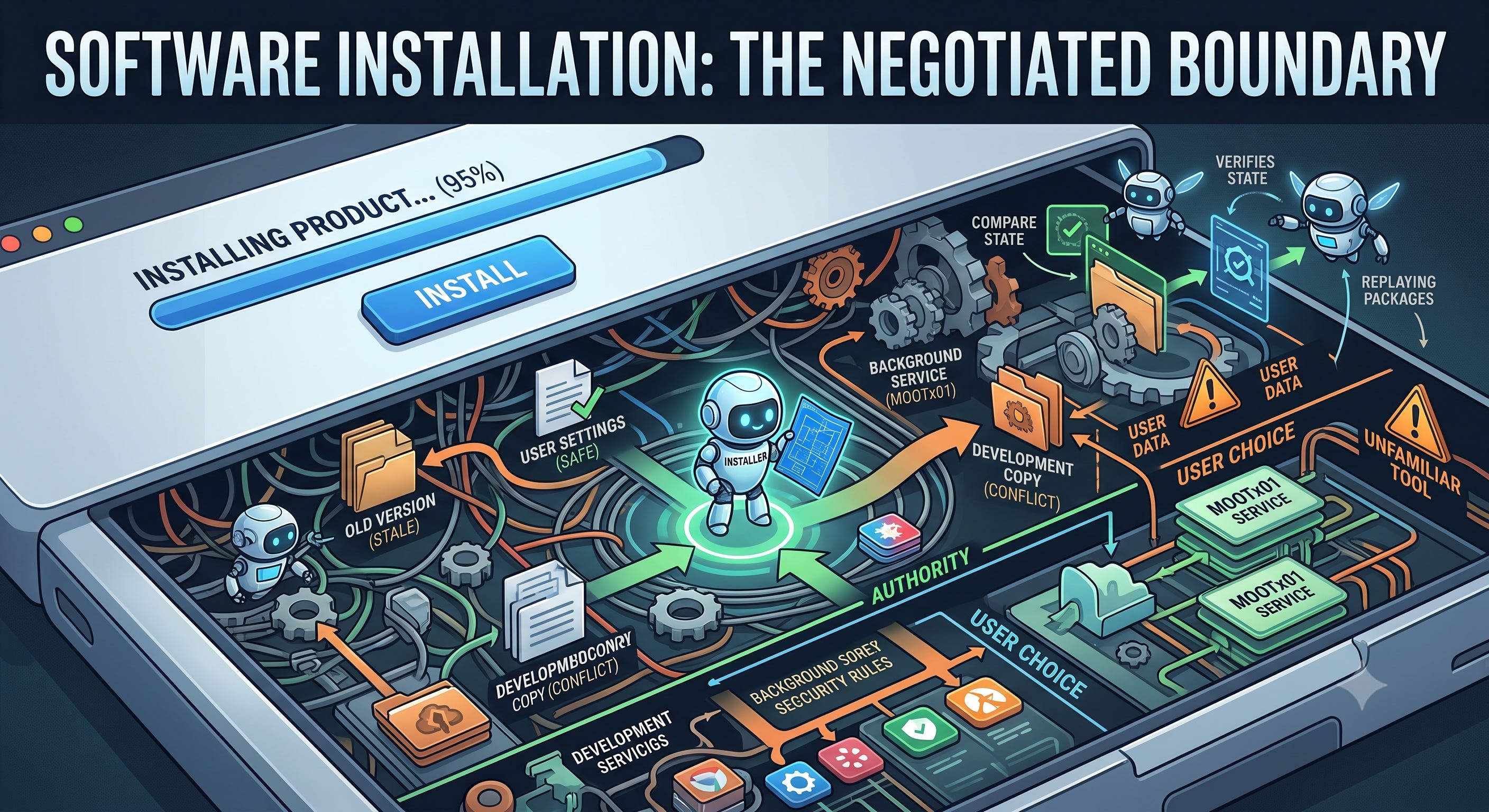
Modern software often asks for fewer clicks while reaching into more parts of the machine. A local tool may need a background service. A plugin may add configuration to another application. An upgrade may replace the program while yesterday’s process continues running the older version.
The user sees one action: install the product. The product has to leave the machine in a condition that both sides understand.
That is a larger job than copying files.
The Machine Is Already Occupied
Before an installer runs, the machine is already in some condition. Even a clean computer has security rules and applications that own their own settings. A machine used for real work may contain an earlier release or a development copy. It may have a plugin that arrived after the first install.
Installation therefore becomes a negotiation with what is already there.
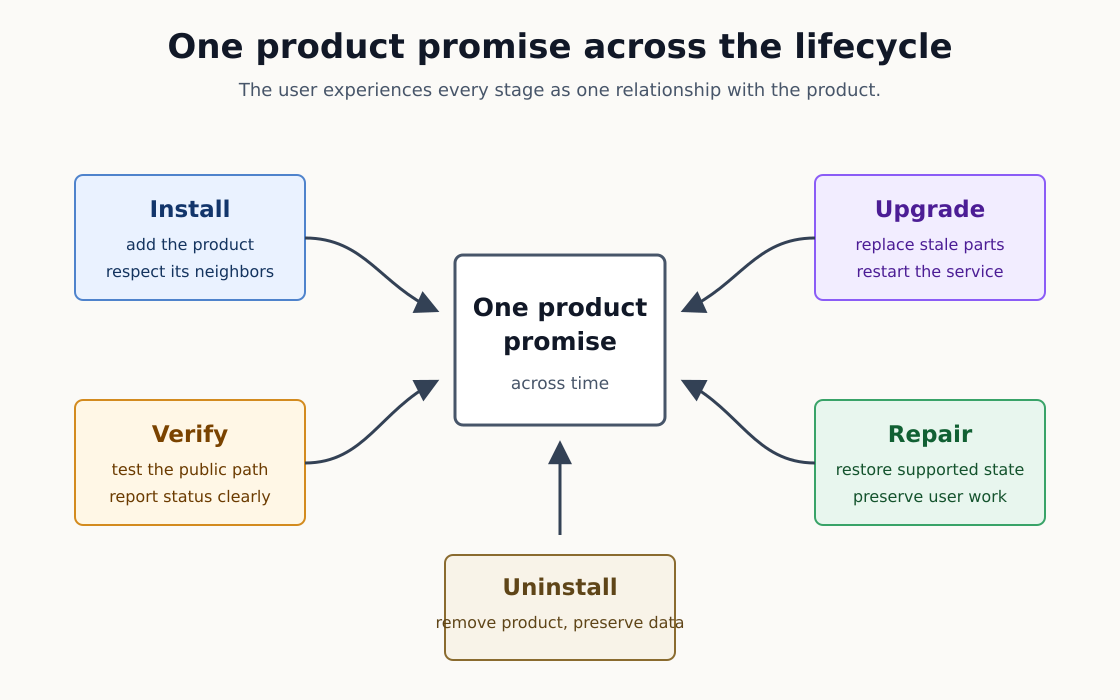
The first install has to add the product without disturbing its neighbors. A reinstall usually means the user wants repair. It should return the software to the same working result. An upgrade has to replace what became obsolete while preserving what still belongs. Uninstall has to remove the product without treating the user’s data as packaging debris.
Those moments are often implemented by different commands and tested by different people. The user experiences them as one relationship with the product.
This is where the installer begins to carry product policy.
The software has to know which files it owns. It needs a way to recognize the service it started and the configuration it wrote. It also needs to know where that authority ends. Another tool may own the process using the port the installer wanted. A person may have customized an entry for a development rig.
An installer that never cleans up leaves the user with every experiment the project ever shipped. An installer that removes everything unfamiliar can damage a working machine. The product has to recognize its own footprints.
Running It Twice Should Not Install It Twice
One useful test is plain enough to explain without engineering language. Run the installer once, then run it again. The second run should leave the same working product rather than create a second copy beside the first.
Engineers call that property idempotence. The word sounds more ambitious than the idea. Repeating an operation should produce the same result.
That property matters because real installation rarely follows the order imagined in a design meeting. A person may begin with the command-line package and add a plugin on Friday. A month passes. They run the installer again because an update changed something or because the service stopped answering.
Each action can be reasonable on its own. Together, they can leave two setup paths claiming the same connection. The new program can arrive while the old service keeps running. A current installer can meet configuration written by a version that no longer exists.
Copying the newest files solves only the easiest part of that problem.
The installer has to recognize what the product created on the earlier run. It can update those pieces and remove entries that became stale. When it reaches an unfamiliar choice, it should explain what it found and leave the decision to a person.
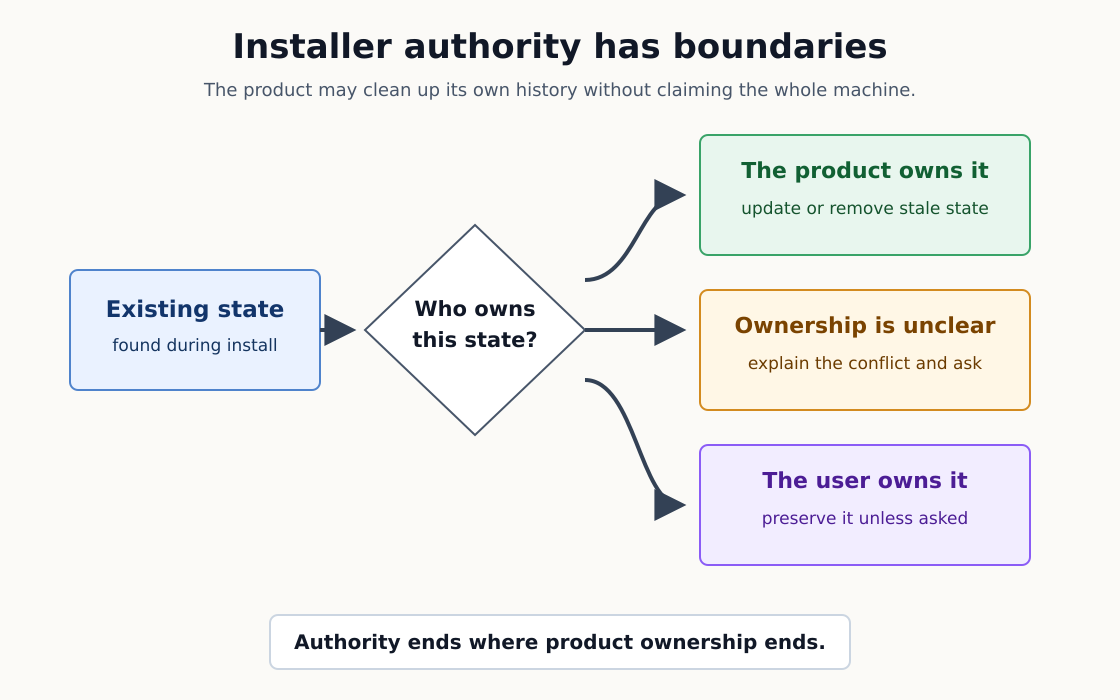
That distinction turns cleanup into a product decision. The user should get the supported result without giving the installer permission to tidy the entire machine.
What Happened After the Five Processes
The first article in this series described a release-readiness pass where we found five copies of one service running. The design called for one. That incident showed how far a working prototype still had to travel before another person could depend on it.
The work that followed taught the installer lesson.
The service was MOOTx01, a local memory system shared by AI tools. One process was the resident service we wanted. Live AI sessions had started private copies through a plugin. Development rigs had added two more. Nobody had taken an absurd path. The machine had accumulated several valid setup methods from different stages of the project.
Each method had done the job it was originally given. The failure appeared when the methods met and nobody owned the result.
The command-line installer could connect an AI client to the resident service. The plugin could provide the same connection. If both acted without checking the other, the client could receive two routes into the same product. The order of installation changed the result.
That last sentence was the problem. A user should be able to install the binary and plugin in either order. The final condition should be one client connection to one resident service.
The installer needed rules for that meeting. When the plugin owns the connection, the command-line installer now recognizes it and avoids creating a competitor. It can remove an older default entry that MOOTx01 created. When it finds a customized development entry, it reports the conflict and leaves the decision to a person.
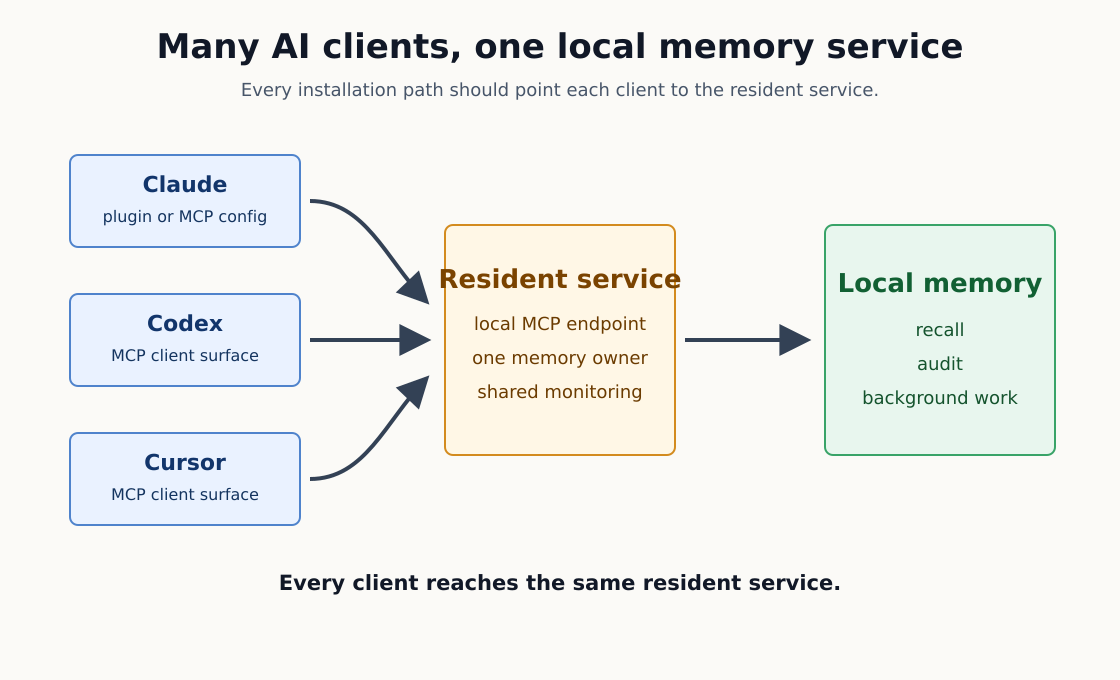
Suggested caption: Different AI clients can share one resident service when every installation path agrees on the destination.
The installer still updates the binary and service when the plugin owns the client connection. Connection ownership and product freshness are separate questions. Skipping one cannot quietly skip the other.
That detail came from another failure. A plugin-owned client once bypassed the part of installation that refreshed its package. The connection worked, but the client could keep older behavior. Fixing the duplicate connection was insufficient because the install had to converge on the current product as a whole.
This is what reconciliation means in practice. The installer looks at the product state already present, applies the current ownership rules, and leaves one supported result behind.
A File in the Right Folder Is Not Proof
The definition of a completed install also had to change.
Finding the binary in its destination proves that a file moved. Running --version proves that the file can print a number. Neither proves that the installed product works through the route the user will take.
We met this problem in several forms. A package upgrade could replace the binary while the resident service kept running older code. A package-manager install could put a helper link in the wrong place. A build could target the wrong processor even though it had the correct filename.
Each artifact looked present. The public path still failed.
A useful installation test begins outside the build folder. The command must run from its installed location. The service must answer after an upgrade. The AI client must reach the service through the configuration the installer wrote. A status command should tell the user what is running and where recovery begins.
This changed release control as well. A candidate now has to prove a working installation instead of stopping at the version string. Generated plugin files have to match the release. Package channels have to point to the same version. Signing failures stop publication because the user receives the artifact rather than the team’s intention.
The installer and release process meet at the user’s machine. That is where every earlier claim becomes testable.
Leaving Is Part of Arriving
Uninstall reveals who the product believes owns the machine.
MOOTx01 stores memory that belongs to the user. Removing the command and service is a software decision. Removing the memory estate is a separate data decision. The normal uninstall path removes the product wiring while preserving the user’s memory.
That choice also creates a recovery path. A person can uninstall and reinstall the software without gambling the material the software was meant to protect. Repair should repair the product.
The same principle applies beyond memory systems. A photo editor does not own the photographs. A database tool does not own the business records. A sync client does not own the documents it moved. Uninstall should remove the product’s machinery and treat user data as something different.
There are cases where a person wants everything removed. The installer should support that choice and state the consequence plainly. A destructive option should require a destructive decision.
The Human Decision Is Authority
AI can carry more of this engineering work than it could a few years ago. An agent can replay different installation orders and inspect the result each one leaves behind. It can compare package contents with the release that produced them. It can repeat the public verification path across every candidate build.
The machine can expose combinations that a tired programmer may never try. The plugin and an old direct entry can appear independently. The service may be running or stopped. Uninstall adds the question of whether user data is present. The test matrix grows quickly, and iteration is useful.
The human decision is about authority.
What may the installer change on its own? Which conflict requires consent? What must survive an uninstall? What evidence is enough to call the installation complete?
Experience helps because people reinstall software while trying to finish other work. Perspective keeps the test on the result the user needs. Imagination provides a path back when the change fails halfway through.
The tools are familiar. Service managers have existed for years. Checksums and signatures are old tools as well. The same is true of configuration backups and smoke tests. AI makes it easier to apply those tools across more possible states. It does not decide which states respect the user.
That remains the human lane.
The First Act of Responsibility
The previous chapter argued that the manual has become part of the interface. The manual can explain the condition the product expects. The installer has to create that condition on a machine with a life of its own.
That difference moves the series forward. Communication is one obligation. Action is another.
The installer acts before the main screen opens. It places files and changes settings. It starts services and may later remove them. It is the first part of the product trusted to change something the user owns.
Once software can act, the next question is where that authority stops. That is where security stops being a feature added near the end and becomes part of product design.
For now, the installation promise is enough. The product should enter carefully and leave the machine in one supported condition. It should prove that condition works while leaving the user’s work alone.
That is part of the product.
Off-Axis Labs: All the science, fewer casualties.
Source Notes
MOOTx01 maintainers, “MOOTx01 CE Install Surface,”
docs/start-here/INSTALL_SURFACE.md.MOOTx01 maintainers, “Installer Interface,”
docs/reference/INSTALLER_INTERFACE.md.MOOTx01 maintainers, “ADR-024: MCP Connection Ownership, Plugin Transport, and Install-Moment Dedupe,”
docs/decisions/ADR-024-mcp-connection-ownership-and-install-dedupe.md.MOOTx01 maintainers,
apps/mootx01/Sources/mootx01/Commands/InstallCommand.swift.MOOTx01 maintainers, “Release Runbook,”
docs/engineering/RELEASE_RUNBOOK.md.MOOTx01 git history for installer convergence, resident-service restart, package architecture, public-path verification, and release signing, reviewed through
4b394617on July 10, 2026.